Product UpdatesInline image editing
Inline image editing
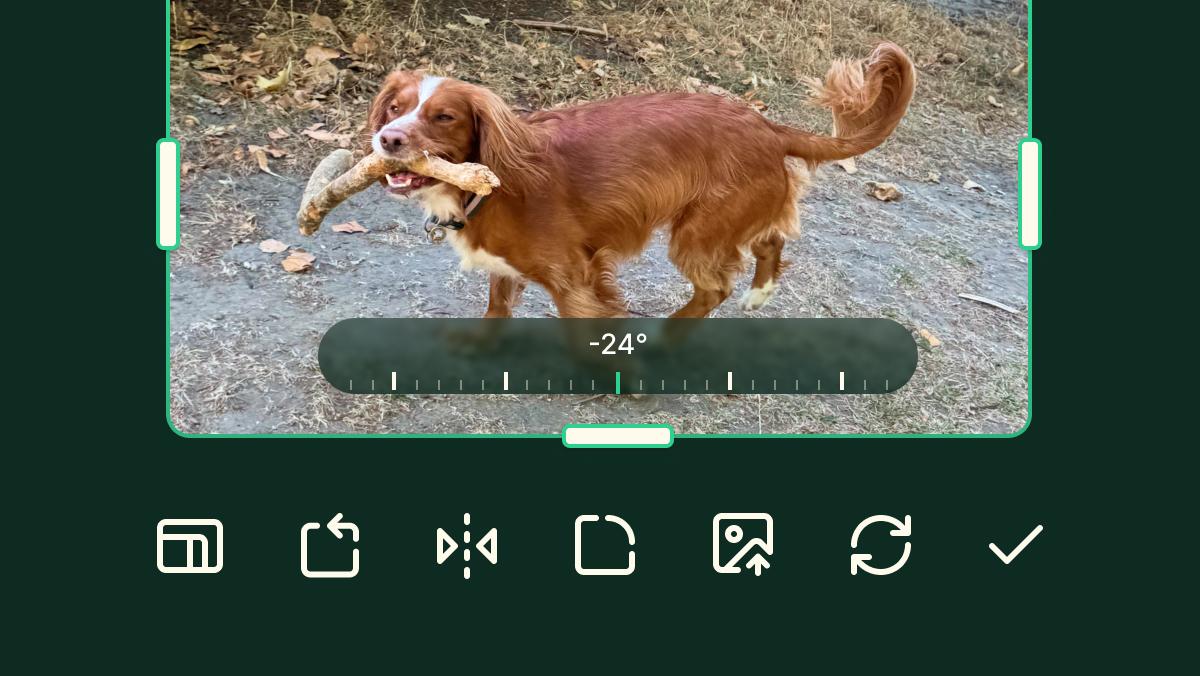
Crop, rotate, and style your images without leaving EcoSend.
One of your most-requested features is here: you can now edit your images without ever leaving the email builder.
Cropping, rotating, or tweaking an image used to mean opening another tool, making the change, then re-uploading it and hoping it still fits. Not any more. You can now perform the most helpful and needed actions to refine your images right within the context of the rest of your email.
What you can do
For any image you add to your email, you can now:
- Crop and zoom
- Change the aspect ratio
- Rotate
- Flip
- Apply a border, with your choice of colour and thickness
- Apply rounded corners, with your choice of border radius
- Replace the image
All without a single trip to another app.
Built on strong foundations
Inline image editing lives on top of the new email builder, and pairs naturally with our recent automatic image optimisation release. Once you’ve cropped, rotated, and styled an image exactly how you want it, we take care of sizing, formatting, and compressing it behind the scenes — so it still loads fast and looks sharp for every recipient.
Learn more in our image editing support doc.
Available now for all customers
Inline image editing is available now for all paying customers at no extra charge.
It’s another real time-saver — less effort, less faff, and one less tool in your workflow. We can’t wait for you to send your most beautiful emails yet, with images looking exactly how you want them.