Your subject line has a secret accomplice: preview text
Most senders leave it blank, or forget it exists. Here's how to make it earn its place.
 James
JamesThe secret of being a bore is to tell everything.
― Voltaire (French writer and philosopher)
Most emails arrive in an inbox with three pieces of visible information:
- The subject line.
- The sender name.
- And a short line of text after it — usually around 90 characters — that appears before anyone opens anything.
That third thing is preview text. Also called preheader text.
And in most campaigns, it's either random code-like nonsense, accidentally filled with "[View in browser]", or a pale repetition of the subject line.
Which is a huge waste. Because preview text is valuable real estate — a second chance to give someone a reason to open.
This seems small, why are we discussing it?
We spend a lot of time exploring how to craft great emails.
But last time I checked, most organisations don't have a 100% open rate. If you do, let me know — I'll temporarily remove my hat of skepticism — I'd love to hear what you're doing 😁.
So whether your open rate is 5% or 95%... chances are, many people are never seeing your actual emails.
Most, though, assuming your deliverability is good, are likely to see the three key details we mentioned at the start: the subject line, the sender, and the preview text.
How preview text works
When you send an HTML email, you can include a hidden snippet of text near the top of the email's code that email clients pull out and display in the inbox view.
If you don't set it, most email clients (Gmail, Outlook, etc) will grab the first visible text in your email instead — often something like "Having trouble viewing this email? Click here."
That's not a great first impression.
Done well, preview text does a specific job: it completes the thought the subject line started, or adds a second layer of intrigue, information, or humanity that tips a recipient from "maybe" to "yes, I'll open this".
Example
Subject line: Your best customers might not be receiving your emails
Preview text: It won't show up in your reports. Your open rate might hint at it.
Those two lines work together. The subject line creates concern; the preview text deepens it. Neither would be as effective alone.
Four ideas to make your preview text work harder
Here are a few ideas to get your creative juices flowing. In each example, the subject line is first and bold, and the preview text is the secondary line, so you can see them more like they'd appear to a recipient.
1. Finish the subject line's sentence
If your subject line is a question or an incomplete thought, preview text can land the answer — or tease it enough to earn the open.
Example
We've been thinking about sending less
Turns out, it's better for everyone. Including you.
2. Add a second hook
If your subject line covers the what, preview text can cover the why — or the who, or the stakes.
Example
17 ways to grow your list ethically
Most list-building advice is written for ecommerce brands flogging trainers.
3. Humanise the send
Preview text doesn't have to be a sales line. It can be a voice — warm, direct, personal. Especially for organisations where relationship is the whole point.
Example
A quick note before we go quiet for August
James here. Just wanted to give you an important update before the summer break.
4. Set the right expectation
If the email is a specific type — a survey, a story, a resource — tell people. Readers who know what they're getting are more likely to open and less likely to be disappointed.
Example
We'd love your opinion on one thing
Two questions. Takes about 90 seconds. Your answers actually shape what we build next.
What to avoid
👎 Repeating the subject line
You've already said that. Use the space to add something.
👎 Generic filler
"Welcome to our July newsletter" is not a reason to open.
👎 Accidentally leaving it blank
Set it intentionally. Every time.
👎 Going too long
Most email clients truncate at around 90 characters. Write short and punchy — the important bit should land in the first 60.
Preview text in a world of AI summaries
Yes we've got to cover the topic of AI briefly...
Gmail and Apple Mail are now using AI to generate short summaries of your emails — sometimes replacing or supplementing the preview text that appears in the inbox. Apple Intelligence (available on most recent Apple devices, like the iPhone 15 and newer), in particular, rewrites what subscribers see before they open based on the actual content of the email, not the preheader snippet you carefully crafted.
This is genuinely new, and it may change the calculus a little for some.
My honest take here is: preview text still matters, for several reasons:
- Most email clients — especially on Android, Outlook, and older platforms — still show your preview text directly.
- And for clients that do generate AI summaries, the summary is often built from your email's actual opening lines.
Which means the best response to AI inbox summaries is the same as the best response to good writing generally: make the first sentence of your email genuinely compelling.
The practical takeaway in an AI world
Don't write preview text as a substitute for a strong opening. Write both.
A great preheader and a strong email intro are complementary — and together, they give you the best chance of landing well whether a human or an algorithm is generating what the subscriber sees.
The inbox is getting smarter. And your copy needs to keep up.
One more thing
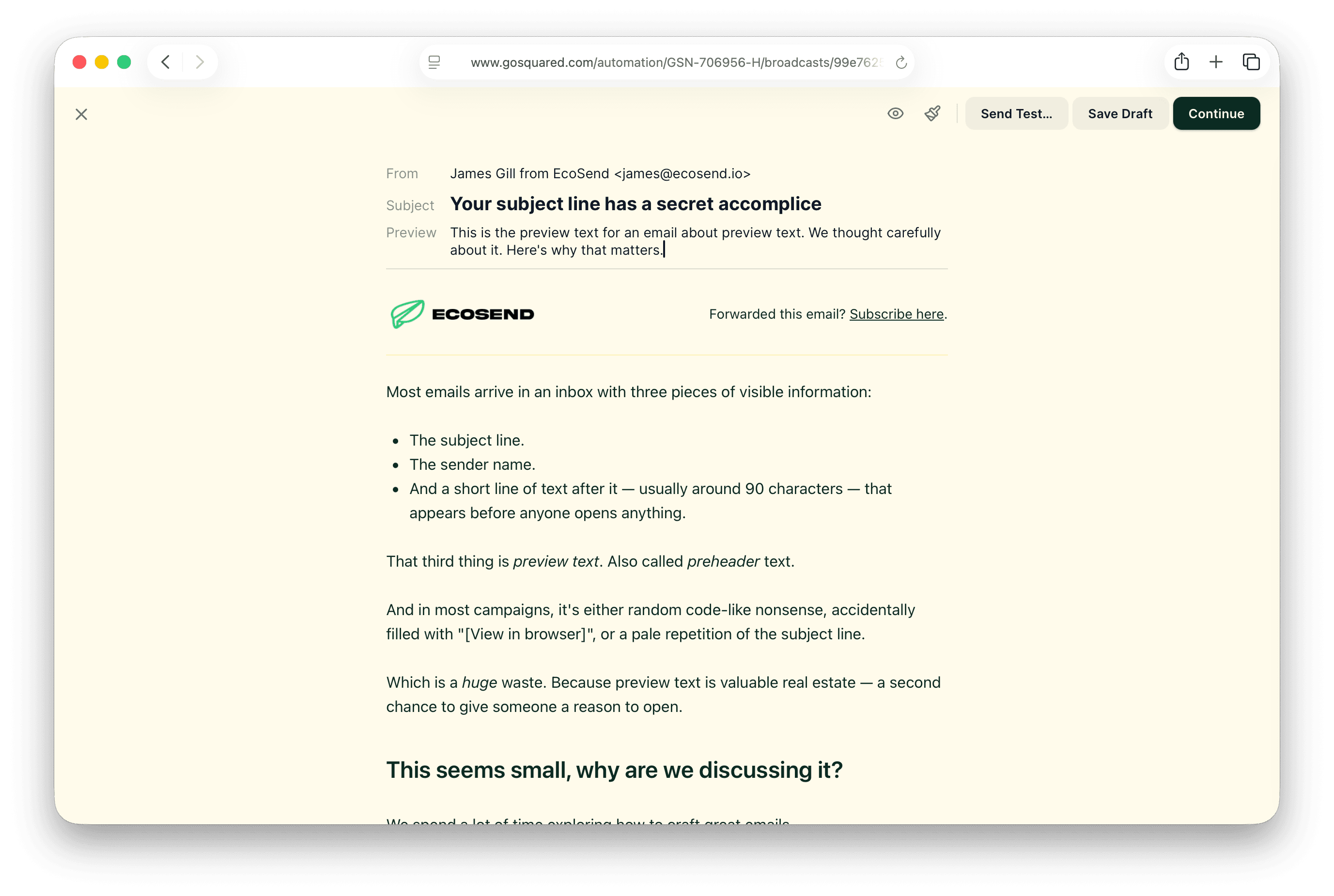
I wouldn't normally give such a shout out in the newsletter, but this week it feels relevant...
We've been working on a completely new EcoSend email builder, and we've been working on this exact challenge.
In most email tools, preview text is buried in settings — easy to miss, easy to forget. We've moved it front and centre in the new builder. You'll see it right alongside the subject line when you're setting up a campaign, which means it's almost impossible to skip or forget.
This is a small but mighty change. And we believe it’ll help our users send campaigns with properly considered preheader text. And ultimately get more of their emails opened — a big win!
The newsletter for purpose-driven marketers
Join hundreds of marketers getting weekly insights on ethical email marketing, sustainable growth, and responsible digital practices.
Unsubscribe anytime. No spam. No nonsense.