What to check before you hit send
Once an email is gone, it's gone. Here's what email pros (and my mum) check before they send — and a checklist so you never forget again.
 James
James
Slowing down enables you to act in a high quality way. Kind rather than curt. Polished rather than sloppy. It's hard to be thoughtful when you're in a rush.
— James Clear (American writer, author of Atomic Habits)
Every week, my mum reads over this newsletter to check for mistakes.
And almost every week she finds something that no amount of personal review, or automated checking can spot.
Now, unfortunately, my mum can’t check every email our customers send, as much as I’m sure she’d gladly offer to help.
So what do you do when you don’t have access to the best proof-reader and email checker?
The most anxious moment of the day…
The campaign is built, the copy's been through three rounds, the images are in, and your cursor is hovering over Send.
Everything looks right. Let’s go!
For many marketing people, this is the most anxiety-inducing moment in the day.
Once you send, it's gone. There's no unpublishing, no quick-fix edit, no "we'll sort it in the next version."
The email lands in tens of thousands of inboxes exactly as it left — typo, dead link, "Hi first_name" and all.
Every experienced marketer and comms lead has a scar from that moment. The apology follow-up is the most-read email most brands ever send, and nobody wants to write one!
The people who've been doing this a long time make the same mistakes as everyone else. But from many conversations with experienced marketers, I’ve found they tend to share one common approach: they’ve made it a habit to to one last deliberate check before sending (with or without an external checker like my mum). And they know exactly what to look at.
After countless conversations, and many mess-ups of my own, here’s our guide for what to check when you next come to hitting the big Send button.
Your pre-send review, in order
1. Check your links
Every single one. The hero button, the inline text links, the logo, the footer. Broken links are the most common send-day disaster and the easiest to miss, because they look completely normal until someone clicks. If there's a discount code, a UTM, or a landing page that only went live this morning — click it. Don't assume.
2. Check your merge tags (aka Variables) and personalisation
"Hi first_name" is the classic, but it's not the only one.
Fallbacks that don't fire, a contact field pulling in blank, a segment condition that's inverted. Personalisation that breaks is worse than no personalisation — it announces that a machine sent this and nobody checked.
If you're setting these up in EcoSend, our guide to Variables walks through fallbacks and how to test them.
3. Check the subject line and preview text
Send a test email, read them together, in an actual inbox, at the length they'll actually appear.
Is the important word still visible after truncation? Does the preview text repeat the subject or add to it? Is there a leftover "TEST" or a draft placeholder hiding in there?
4. Check the sender details
Is the sender name and email address the one you intended, or a system default? The sender name is just as important as (and sometimes more important than) your subject line for building trust and getting your email opened.
5. Check the images (and their alt text)
Do they all load? Are any still pointing at an old URL?
Are any of them heavier than they need to be?
And crucially: does the email still make sense with images off, which is how some subscribers may first see it? Alt text isn't just accessibility box-ticking — it's what carries your message when the pictures don't arrive (like when your recipient is on their commute on the London Underground), and part of making sure your emails are accessible to everyone on your list.
6. Check how it looks on mobile
Most of your list opens on a phone. A layout that's elegant on desktop can collapse into a single squashed column with a button that becomes broken or completely unusable. It’s especially important to check on mobile when you have a more complex layout with columns and multiple images. Look at it small before you look at it sent!
7. Check the key details (that have real consequences)
Selling something? Check the actual discount amount.
Running an event? Check the date and time of the event. The price. The venue. The deadline.
These are the errors that don't just look sloppy — they cost money, trigger refunds, and generate support tickets. Read them slowly, and out loud if you want to really check.
8. Check the unsubscribe link
Is the unsubscribe link present and working? It’s a fundamental one, it’ll lead to complaints, and if it’s not working it can risk tanking your reputation.
Keep yourself compliant and keep your emails out of spam folders.
9. Check for typos
We all have a spellcheck on our computers, but typos can creep in in the places we least expect.
Every time I write anything I’m reminded of the time my mum spotted a typo on the front page of a magazine going to print. We’re often so busy checking the details we forget to check the most prominent text — the subject line, the titles, and lines we skip because we’re so confident in them.
10. Check for grammar mistakes
Just as with typos, it’s so easy to make a simple grammar mistake when we’re writing.
We know what we want to say, and when we read it back, we skim through with the knowledge of our own intent. Nothing beats getting another team member to take a glance over the email to double-check you haven’t used a “their” instead of a “there”.
Why it’s so easy to slip up
None of this is hard, but that’s why it can sometimes feel like it can be skipped.
Pre-send checks are the definition of an invisible, repetitive task — the kind that gets squeezed when you're rushing to make a send window, or when the campaign's been signed off and everyone's waiting around for you to “just get it live”.
The checklist lives in someone's head, or in a wiki nobody opens, and under deadline pressure the head-checklist gets shorter and shorter until it's just "does it look about right? OK I’ll hit Send!”
And while a solo look at your own work is better than nothing, it’s the weakest kind of proofreading there is. You read what you meant to write, not what's on the screen. You've seen this email twenty times; your brain is very good at filling the gaps automatically.
The fix isn't to try harder. It's to make the check structural — something that happens every time, in the same place, without relying on memory or willpower.
So we have a few gifts for you
1. Your free pre-send email checklist
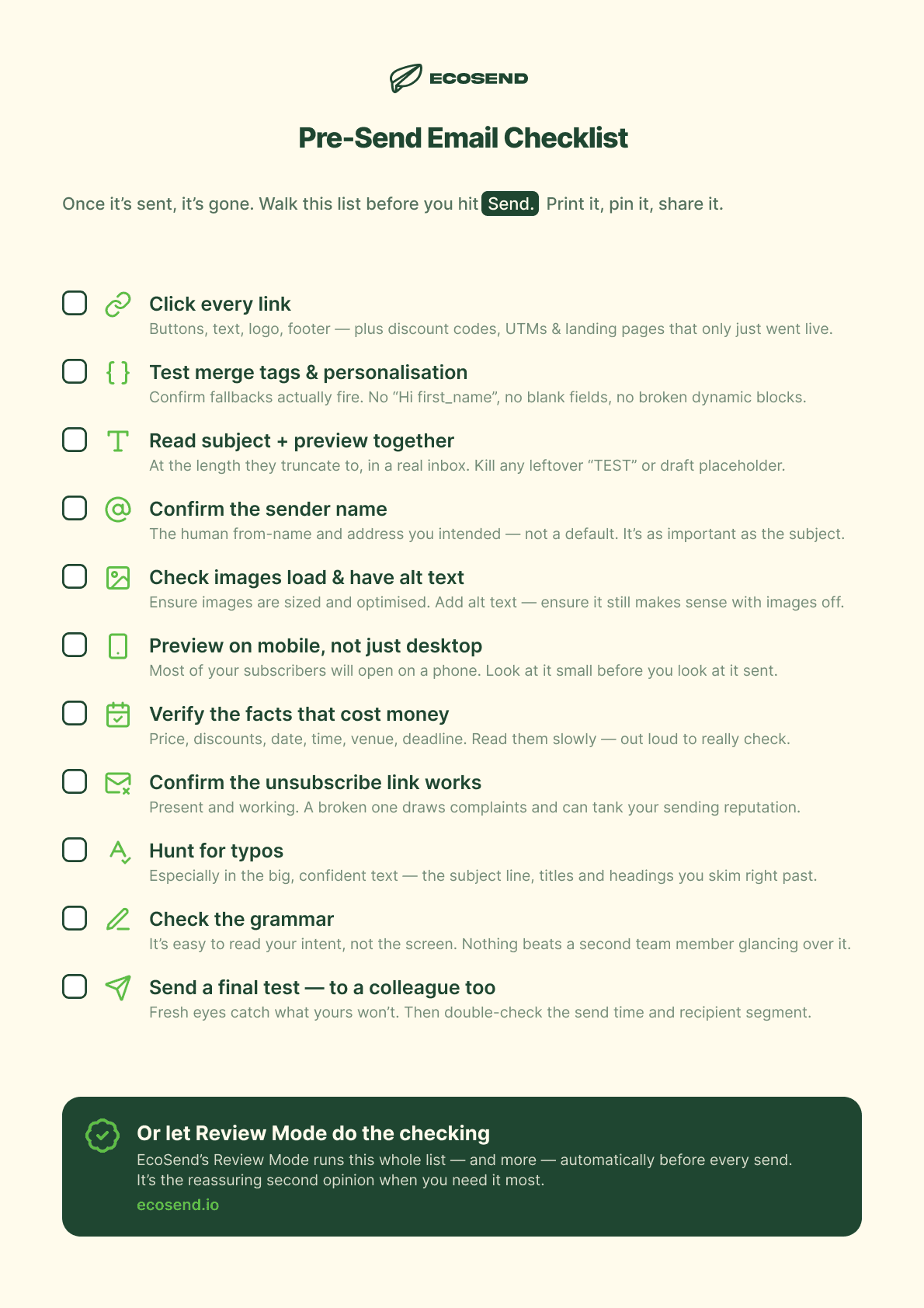
We put together these steps and checks in a downloadable cheat sheet. Feel free to steal this — print it, pin it, or Slack it around to your team.
Before you hit send, be sure to cast your eyes over the EcoSend pre-send email checklist:
2. Introducing Review Mode in EcoSend
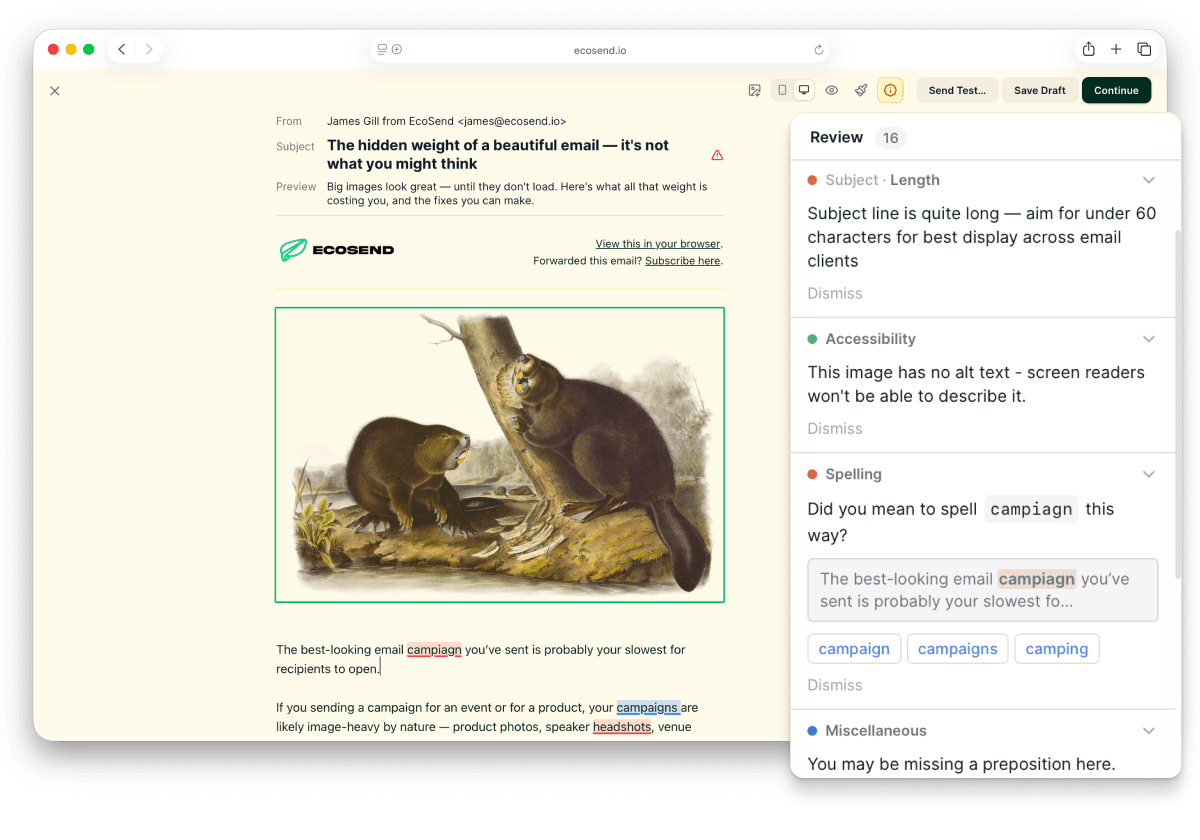
What's better than a checklist? An automated check right by your side as you create your email.
This week we released Review Mode in EcoSend. We’re rather excited about it.
Before any campaign goes out, Review Mode gives you a single, calm pre-flight checklist — it’s an objective and detail-oriented review over everything that tends to go wrong, continuously updated with every change you make. And, in news that goes against the grain of 2026, it doesn't use AI.
It checks your spelling. It checks for common grammar mistakes. It catches merge tags that will fail on send and personalisation fallbacks that aren't set. It highlights potential problems with showing up in the inbox — like subject line length, preheader text, from-name issues. It surfaces images missing alt text and even flags contrast and readability issues. Plus a whole lot more. And it gives you a clear, tickable list to walk through before you commit.
Review Mode isn’t there to slow you down or nag you. It's there to be the second set of eyes you don't always have on a small team — so the deliberate last look happens every time, not just on the sends you remembered to be careful about.
The goal is simple: fewer apology emails, fewer broken discount codes, fewer "resending with the correct link" subject lines.
And a bit more calm in that last minute before you hit send — with or without a check from my mum.
Try it now
Your next campaign is a good place to try it. Build as you normally would, then — instead of heading straight for Send — open Review Mode (or the checklist above) and walk through the checks one-by-one. It takes a couple of minutes and it's the cheapest insurance for your email.
If you're not yet using EcoSend, you can get started completely for free, with no billing details or commitment required. Review Mode is available for all paid plans at no extra charge, and if you want to try Review Mode before paying, just let me know by replying to this email.
Also, if you fancy it, hit reply and tell me the worst thing you've ever accidentally sent. We collect these and will share them in a future piece. It helps to know none of us are alone in making horrendously embarrassing email mistakes.
Until next time,
James
The illustration in this post is of a Grey Heron, a bird that stands perfectly still at the water's edge before making one committed strike. "Héron cendré" by Des Murs, from Musée ornithologique illustré (Paris: J. Rothschild, 1886–1887), via Biodiversity Heritage Library.
The newsletter for purpose-driven marketers
Join hundreds of marketers getting weekly insights on ethical email marketing, sustainable growth, and responsible digital practices.
Unsubscribe anytime. No spam. No nonsense.