Review Mode
Review Mode automatically checks your whole email for common mistakes — from typos and broken links to accessibility and compliance issues — and proactively suggests one-click fixes for each of them.
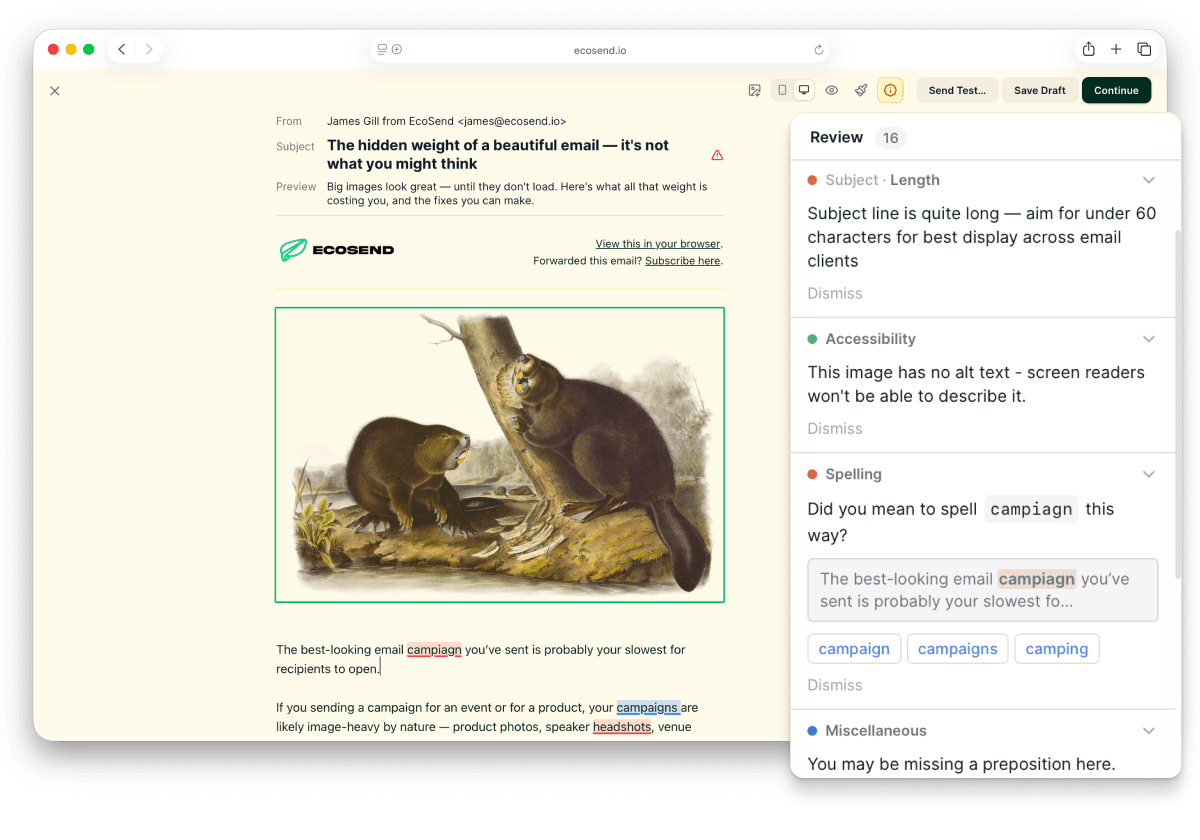
There's nothing to configure and nothing to switch on. As you compose in the email builder, Review Mode watches over your email and notifies you of anything that needs attention, so you can be confident your campaign is ready before you hit send.
Review Mode is available to all paying customers at no additional cost.
What Review Mode checks
Spelling and grammar
Review Mode checks the contents of your whole email — highlighting anything that may need a second look, and giving you suggestions in milliseconds.
Spelling and grammar checks are currently available for English language users only.
Accessibility
Review Mode makes it easy to spot common accessibility issues that often get missed:
- Colour contrast — readability issues caused by low colour contrast on text, titles, buttons, and links.
- Missing alt tags — images without alt tags are flagged so you can set each one before sending.
For more on making your campaigns accessible, see our guide to accessible emails.
Compliance and email basics
Review Mode also catches the fundamentals that are easy to overlook in the heat of the moment:
- Subject line length.
- A working unsubscribe link.
- Call-to-action buttons that are missing links.
- Broken links.
- Variables with working data and fallbacks.
- Left-over templated social links.
Fixing issues
When Review Mode finds an issue, it notifies you and proposes a solution. Most issues can be resolved with a single click, so tidying up your email before sending takes moments rather than another full proofread.
Privacy: no AI, no third parties
Review Mode does not send your email contents to a third party or process anything with AI. All checks — including spelling and grammar — happen entirely on your device. You can read more about our stance on AI in our AI policy.
Last updated July 2026