Insights
EcoSend Insights give you a project-level overview of the performance of your email marketing.
Every email you send across your entire project in EcoSend is reflected in the reporting and charts shown in Insights.
It’s a great way to get birds-eye view of your email marketing, see trends, and address any issues proactively.
View the EcoSend Insights dashboard
You can access your Insights dashboard by clicking Insights in the sidebar.
The widgets displayed across Insights detail the key metrics of all email campaigns sent out via your EcoSend Broadcasts, Sequences, and Automated Messages.
You can adjust the time-period from the top right-hand corner in order, and use this to compare your campaigns over different time-periods.
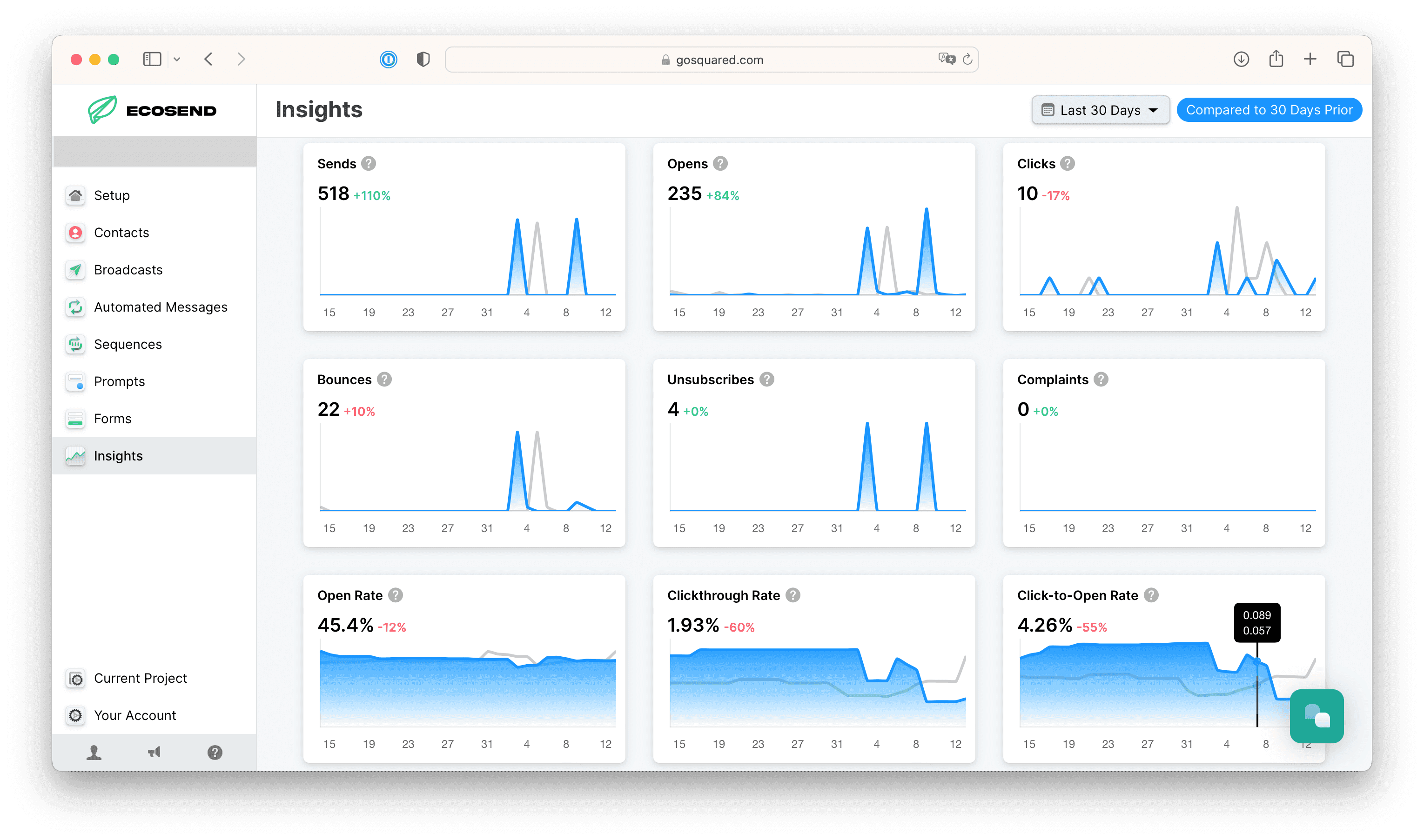
The metrics you’ll see in Insights
Sends
The total number of email messages that were sent in the time period.
Opens
The total number of messages that were opened in the time period.
Clicks
The total number of messages where a recipient clicked a link in the time period.
Bounces
Email messages that could not be delivered within the time period.
Unsubscribes
Total number of times an 'unsubscribe' link was clicked within emails within the time period.
Complaints
Total number of times an email was reported as spam by the recipient within the time period.
Open Rate
What percentage of emails were opened by recipients, calculated based on sends & opens within a 30 day window.
Click Through Rate
What percentage of emails were clicked by recipients, calculated based on sends & clicks within a 30 day window. Learm more about click-through rate.
Click-to-Open Rate
For recipients who opened an email, what portion went onto click a link in the email, calculated based on opens & clicks within a 30 day window. Learm more about click-to-open rate.
Bounce Rate
Bounce rate is the percentage of emails that weren't able to be delivered, based on sends and deliveries within a 30 day window.
For our guide on identifying and removing regularly bouncing email addresses, please see our article here. Learn more about bounce rate in our marketing glossary.
Unsubscribe Rate
What percentage of emails caused recipients to click an unsubscribe link, calculated based on sends and unsubscribes within a 30 day window.
Complaint Rate
The percentage of emails that were marked as spam by recipients, calculated based on sends and spam complaint feedback within a 30 day window.
Analysing and taking action on your data
Use this information to optimise your email campaigns. If you notice any of your key metrics dropping off, some steps you can take include:
- Try a different subject line with our Subject Line Generator.
- Adjust the frequency of your messaging — you may be sending out too many emails within a short time-period, causing email fatigue for your recipients.
- You may have neglected emailing your recipients for too long, so they have now gone cold and require more nurturing or a pruning of your email list.
- Reduce the number of CTAs and buttons within your emails.
- You might be interested in our weekly newsletter for tips and inspiration to level up your email marketing game.
- We’re always here if you have any questions or want to discuss your data — just get in touch and we’ll be more than happy to chat.
Last updated October 2026