Projects
A project is a self-contained home for one brand's email marketing. Everything you need to run that brand's campaigns lives inside it: its contacts, emails, sending domain, team, and reporting.
Most people only ever need one project. But if you look after more than one brand, business, or client, projects let you run them all from a single EcoSend account, without anything ever getting mixed up.
What lives inside a project
Each project has its own:
- Contacts, including their properties, lists, and Smart Groups.
- Emails: Broadcasts, Automated Messages, and Sequences.
- Forms and their notifications.
- Sending setup: email domains and Sender Profiles.
- Team, with its own members and permissions.
- Integrations, such as your Zapier project key, webhooks, and tracking code.
- Insights, so reporting only ever reflects that project's emails.
- Settings, such as the project name, timezone, business address, and privacy policy.
Your plan and billing sit above your projects, in Your Account > Billing & Invoices, so you manage billing in one place, however many projects you run.
Why projects are so useful
- Complete separation. Contacts, emails, and data in one project are never visible in another. There's no risk of a newsletter going to the wrong audience, or one client seeing another client's subscribers.
- Access that fits. Team members only see the projects they're invited to. You can bring in a client, a freelancer, or a colleague without opening up the rest of your account.
- Reporting you can trust. Each project's Insights only include its own emails, so you always get an honest picture of how each brand is performing.
- Room to grow. Adding a new project takes seconds, so launching a new brand or onboarding a new client is quick and painless.
When to use a project
Create a separate project when you have:
- Different clients. Agencies, freelancers, and consultants can give each client their own project. See EcoSend for agencies, freelancers, and consultants.
- Different brands or businesses. If you run more than one company, or a group with several distinct brands, each one can have its own project, sending domain, and look.
- Audiences that should never mix. For example, a charity's supporters and a separate trading arm, or a university's departments that run their own communications.
- A place to experiment. A spare project is a safe space to try out integrations, webhooks, and automations before you roll them out.
When a project isn't the answer
If you're talking to the same audience under the same brand, keep everything in one project and organise your contacts instead. Lists let people choose what they hear from you, and Smart Groups let you target anyone by their properties and activity. That way, each person stays as one contact with a single, complete history.
Create a new project
- Click the project name at the top of the sidebar to open the Project Switcher.
- Choose Add Project.
- Enter a name for your project, and the website it's for.
- Click Get Started…
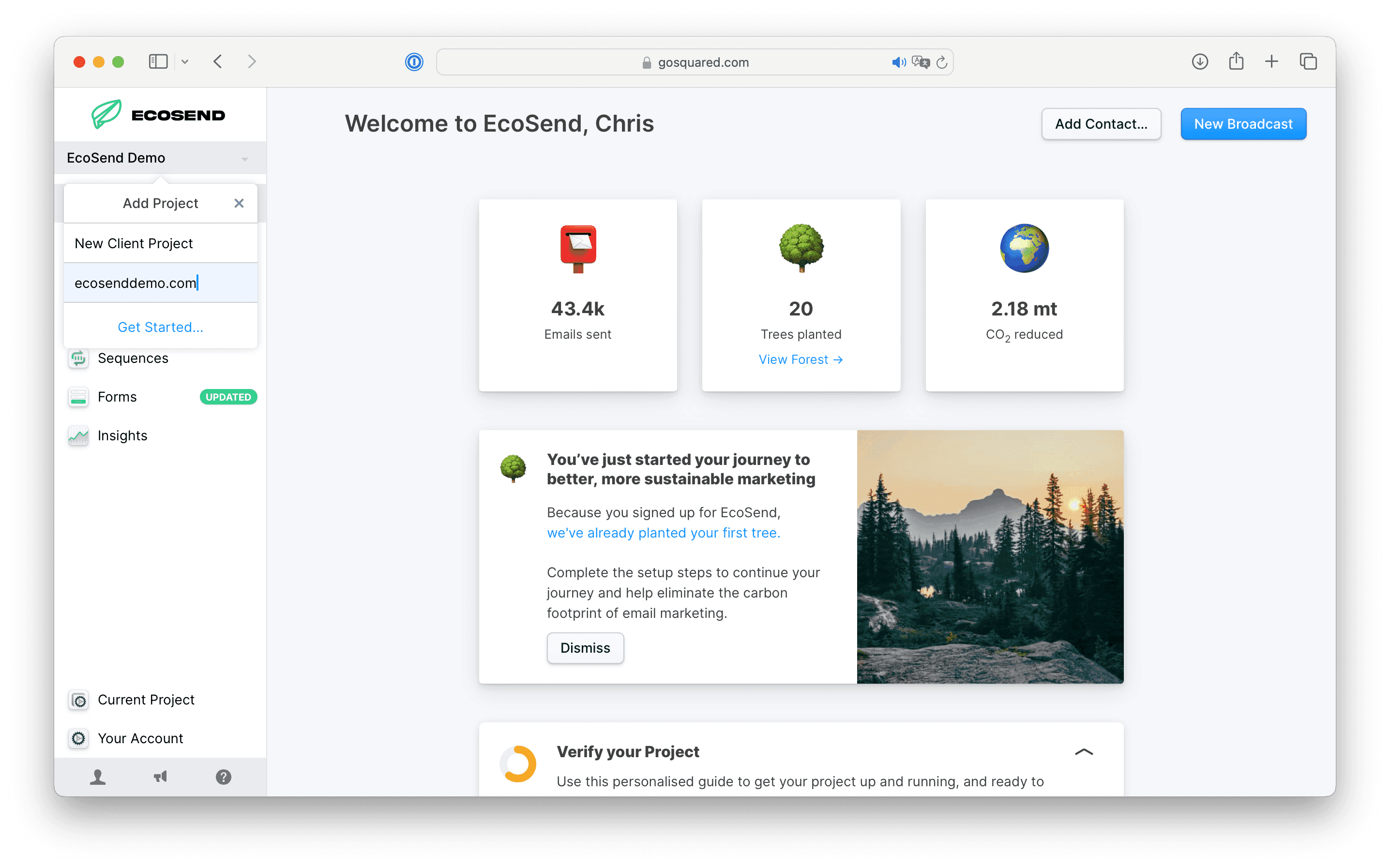
Your new project opens with a Verify your Project guide that walks you through everything you need to start sending, including adding your email domain and setting up your Sender Profile.
Good to know
- Check which project you're in. Before you import contacts, send a Broadcast, or copy an integration key, glance at the Project Switcher to make sure you're in the right project.
- Set up sending for each project. Each project has its own domains and Sender Profiles, so a new project needs its sending domain set up before it can send.
- Invite people project by project. Inviting someone to one project doesn't give them access to any other. Learn more about managing your team.
- Integrations are per project. If you connect a tool like Zapier to several projects, each connection uses that project's own key.
- Deleting a project doesn't cancel your subscription. Only Owners and Admins can delete a project. To cancel your plan, see how to cancel your account.
Have a setup in mind and not sure how best to organise it? Get in touch and we'll help you find the right structure.
Last updated November 2026